Rock Star Gnome: A Designer’s Real-World Embroidery Review
First Impressions: Playful, Polished, and Surprisingly Versatile
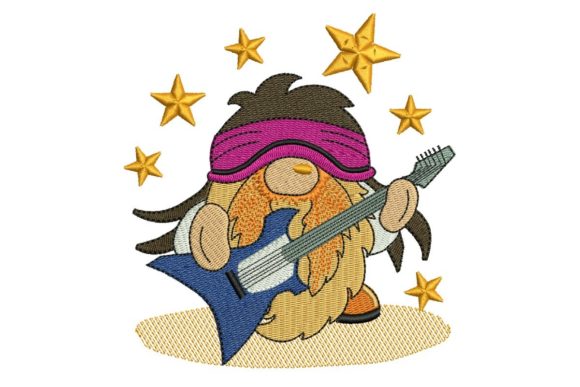
When I opened Rock Star Gnome for the first time—prepping it for a custom embroidered tote bag order—I wasn’t expecting such immediate visual clarity. The design lands with confident charm: a whimsical gnome wearing sunglasses, a tiny guitar slung over one shoulder, and a subtle sparkle motif near the brim of his hat. It’s not cartoonish overload; it’s balanced. The proportions are smart—head size relative to body, instrument scale relative to hands—and the negative space breathes just enough to keep it from feeling dense or cluttered. As a machine embroidery design rooted in the Music theme, it avoids cliché (no giant amp or exaggerated “rock on” fist) and instead leans into personality. That makes it work equally well for a boutique baby onesie as it does for a women’s sweatshirt sold at a craft fair.
How It Stitches: Where Rock Star Gnome Shines—and Where It Needs Care
I stitched Rock Star Gnome across six fabric types: midweight cotton twill (for tote bags), fleece-lined sweatshirts, 100% cotton tea towels, lightweight rayon-blend baby bodysuits, structured cotton caps, and linen pillow covers. On stable, medium-weight fabrics like twill or quilting cotton, it stitched cleanly every time—no thread breaks, no puckering, and excellent satin stitch definition on the guitar body and sunglass frames. The fill stitch areas (hat, tunic, boots) held shape without oversaturation, and the running stitch accents (like the tiny music note near the base) stayed crisp.
But real-world embroidery isn’t always ideal. On thin, stretchy baby knit, I needed a tear-away + cut-away stabilizer combo and slowed my machine speed by 25%. Without that, the small facial features blurred slightly. On dark fabric—especially navy fleece—I swapped standard white thread for a high-contrast off-white and added a light underlay stitch to lift the satin elements. And on curved surfaces like caps? I used a smaller hoop size than the full design suggests and repositioned the gnome’s guitar horizontally—not vertically—to avoid distortion at the crown seam.
A Real Project Test: From Mockup to Marketplace
Last month, I used Rock Star Gnome on a limited run of organic cotton aprons for a local record store’s staff gift set. We paired it with a simple monogram below the design, stitched in charcoal gray thread. Customers loved it—not just as apparel, but as a conversation piece. One Etsy seller told me she’s now listing Rock Star Gnome–embroidered patches alongside vintage-style band merch. That tells me something important: this isn’t just a novelty. It reads as intentional design, not clipart. It elevates a handmade product without demanding expert-level digitizing knowledge. For craft business owners, that means faster turnaround, fewer test runs, and more consistent finished product quality.
Where It Fits Best (and Why)
- Tote bag design: Sits perfectly centered on the front panel—large enough to read, small enough not to overwhelm.
- Sweatshirt embroidery: Works especially well on left-chest placement; the compact height keeps it proportional on both youth and adult fits.
- Baby embroidery: Gentle theme, no sharp edges or aggressive iconography—ideal for gender-neutral nursery decor or milestone blankets.
- Holiday embroidery: Stitched in metallic gold thread on black velvet, it became a standout stocking stuffer for music teachers and band parents.
- Embroidered patch: Holds up beautifully when heat-applied or sewn on denim jackets—clean edges, minimal fraying risk.
Use With Intention—Not Assumption
Rock Star Gnome is not a “set-and-forget” embroidery file. Its charm depends on thoughtful execution. Avoid using it on ultra-thin silk or heavily textured burlap without testing first—the fine details (guitar strings, sunglass reflection lines) can vanish. On layered garments like hoodies with thick drawcords, consider simplifying or omitting the smallest accent stitches. And if you’re selling Rock Star Gnome–embroidered items commercially, confirm licensing terms before listing on Etsy or your own shop. Not all embroidery files permit resale of finished products.
Design Notes Every Embroiderer Should Check Before Stitching
- Test Rock Star Gnome on scrap fabric matching your final project’s weight and stretch.
- Review stitch density visually—if the fill areas look overly heavy, adjust underlay or reduce density in your software.
- Confirm hoop size compatibility. Some versions include multiple sizes; choose based on your garment area, not just maximum hoop capacity.
- Inspect small details at 200% zoom in your embroidery software—especially the guitar pick and star accents.
- Run black-and-white mockups to gauge contrast on light vs. dark backgrounds.
- Use appropriate stabilizer: cut-away for knits, tear-away for stable wovens, and fusible for lightweight linens.
- Check thread color harmony—not just contrast, but tone. Warm grays and muted teals often outperform stark black/white combos.
- If offering Rock Star Gnome as part of a digital embroidery bundle, verify its compatibility with common formats (.pes, .jef, .dst) and clarify usage rights upfront.
Final Thought: It’s More Than a Gnome—It’s a Design Decision
Rock Star Gnome doesn’t scream “look at me.” It invites engagement—smiles, questions, stories. That’s rare in embroidery design assets. As a designer who evaluates hundreds of machine embroidery designs each year, I don’t recommend them lightly. But Rock Star Gnome earns its place in my go-to folder for custom apparel, personalized gifts, and small shop merchandise because it delivers on three things: visual coherence, technical reliability, and emotional resonance. Whether you’re stitching it for a holiday gift, prepping a batch of embroidered patches, or building digital embroidery bundles for your Etsy shop—it rewards attention, not just automation. And in today’s handmade market, that kind of thoughtful design is what builds trust, repeat buyers, and quiet pride in every finished product.